 yupi-translate-app[bot]
19 KiB
Vibe Coding Mini Program Development
Hello, I'm Yupi.
In previous articles, we created web applications that can be accessed in browsers. Now, let's learn how to develop WeChat Mini Programs, allowing your applications to run within WeChat.
WeChat Mini Programs are applications that can be used without downloading or installing. They leverage WeChat's massive user base, making them an excellent platform for individual developers. Mini Programs have low development costs and easy user reach.
In this article, I'll guide you through creating two practical Mini Programs: a budgeting app and a habit tracker. I'll also explain the entire development and launch process in detail, enabling you to independently complete the journey from development to deployment.
Please note that this tutorial is more of a guide for project development ideas and processes, aiming to teach you how to use Vibe Coding for project development. You'll need to practice on your own. If you need more comprehensive Vibe Coding tutorials with images and videos, check out Yupi's original project实战 section.
1. Mini Program Development Basics
Before diving into projects, let's cover some basic knowledge about Mini Program development.
Mini Programs are lightweight applications that don't require installation and are designed for quick use. WeChat Mini Programs are the most popular platform, but there are also Alipay Mini Programs, Douyin Mini Programs, and others. The advantages of Mini Programs include low development costs (compared to native apps), easy user reach (due to WeChat's large user base), relatively lenient review processes, and rapid iteration.
What’s the difference between Mini Programs and Web Applications?
Simply put, Mini Programs run within the WeChat environment and have specific APIs and limitations. For example, Mini Programs can call WeChat's payment, sharing, and QR code scanning features but cannot directly access external links. From a development perspective, Mini Programs use a syntax similar to Vue, with their own component systems and lifecycle methods. If you know web development, learning Mini Programs will be quick.
The tech stack for WeChat Mini Programs includes WXML (similar to HTML), WXSS (similar to CSS), and JavaScript. You can develop using native methods or frameworks like Taro or uni-app for cross-platform Mini Programs. For Vibe Coding, I recommend using native development because AI supports native syntax better, resulting in higher-quality code.
To develop Mini Programs, you’ll need:
- A WeChat Developer Account (free to register)
- WeChat Developer Tools (the official IDE)
- A project idea
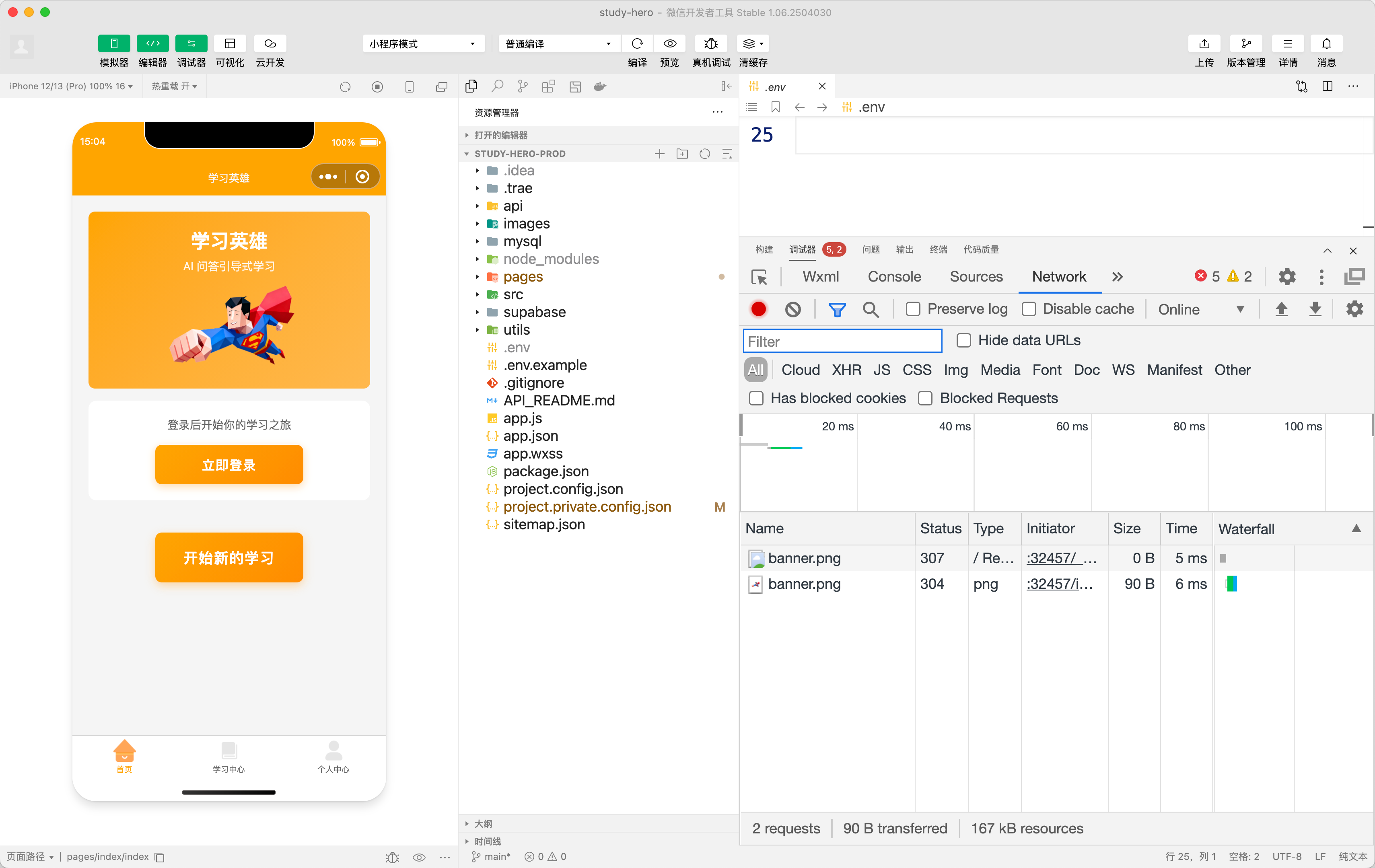
Registering an account is straightforward—just go to the WeChat Official Platform and register a Mini Program account, selecting the personal type. Downloading the developer tools is also simple—just visit the official website and download the version for your system.
Developing Mini Programs with Vibe Coding is similar to developing web applications, with slight syntax differences. You need to tell the AI that you're developing a WeChat Mini Program, and it will generate code that complies with Mini Program standards. For example, you can say, "Please create a budgeting page using WeChat Mini Program native syntax, including amount input, category selection, and note input." The AI will generate WXML, WXSS, and JS files.
💡 If you want to systematically learn Mini Program development, check out Yupi's free comprehensive Mini Program learning roadmap on CodeFather.
2. Project实战 - Budgeting Mini Program
Budgeting is a practical feature that many people need. Creating a budgeting Mini Program allows you to learn the basic development process, including data storage, page navigation, and component usage.
This budgeting Mini Program will implement basic budgeting features. Users can add income and expense records, including amount, type (income/expense), category (food, transportation, salary, etc.), notes, and date. The home page displays a list of records and statistics (monthly income, expenses, and balance). Records can be filtered by date. Data is stored locally using WeChat's local storage API.
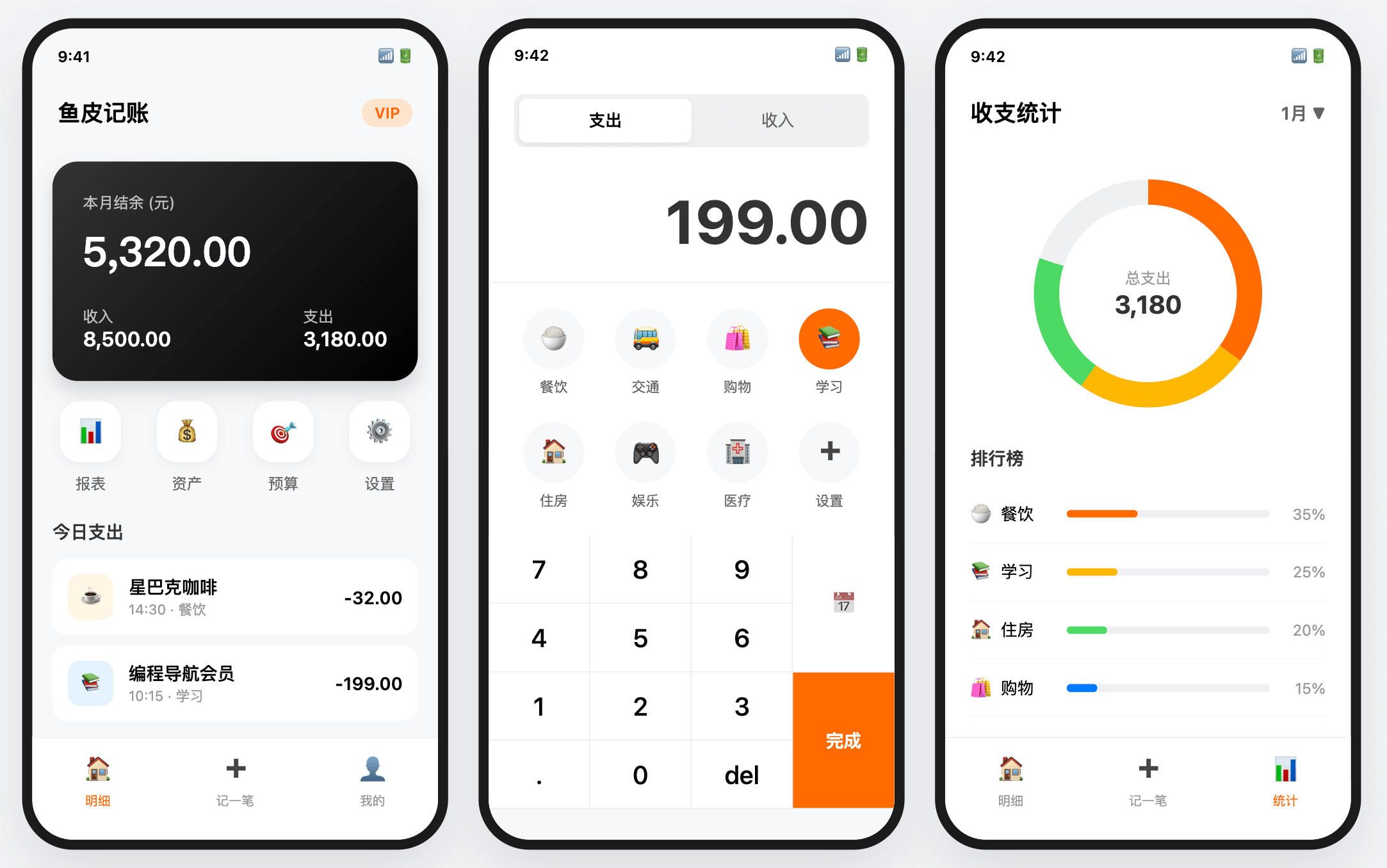
We’ll use WeChat Mini Program native development without any frameworks. Data storage will use wx.setStorageSync and wx.getStorageSync.
Development Steps
-
The first step is to register a Mini Program account. Go to the WeChat Official Platform and register a Mini Program account. Select the personal type, fill in the basic information, and complete the registration. After registration, you’ll receive an AppID, which is needed for development.
-
The second step is to download the developer tools. Go to the WeChat Open Documentation and download the WeChat Developer Tools. Install it and log in using WeChat.
-
The third step is to create a project. Open the developer tools, click "New Project," fill in the project name, select the project directory, enter the AppID, and choose not to use cloud services. Click "OK," and a Mini Program project template will be automatically generated.
-
The fourth step is to understand the project structure. The basic structure of a Mini Program project includes:
pagesdirectory: Contains pages, each with wxml (page structure), wxss (page style), js (page logic), and json (page configuration) files.utilsdirectory: Contains utility functions.app.js: Mini Program logic.app.json: Mini Program configuration.app.wxss: Global styles.
- Now, open the project directory with Cursor and start developing with AI.
First, design the data structure:
I want to develop a budgeting Mini Program. Please help me design the data structure.

Information to store:
- Amount
- Type (income/expense)
- Category (food, transportation, shopping, salary, etc.)
- Notes
- Date

Please provide the JavaScript object structure.
The AI will help you design a reasonable data structure, including the type and description of each field.
Next, create the home page:
Please create the home page (pages/index/index) using WeChat Mini Program native syntax:

Top section displays statistics cards:
- Monthly income (green)
- Monthly expenses (red)
- Monthly balance (blue)

Middle section displays the record list:
- Grouped by date
- Each record shows: category icon, category name, notes, amount
- Income displayed in green, expenses in red

Bottom section has a large "+" button that navigates to the add page.

Use Flex layout, and make the interface visually appealing.
This prompt details the layout and style of the home page. The AI will generate complete WXML, WXSS, and JS code.
Next, implement data storage:
Create a utils/storage.js utility file to encapsulate data storage operations:

1. saveRecord(record): Save a record
2. getRecords(): Get all records
3. deleteRecord(id): Delete a record
4. getMonthRecords(year, month): Get records for a specific month

Use wx.setStorageSync and wx.getStorageSync for data storage.
Records should have a unique ID (can use a timestamp).
This encapsulates the data storage logic, making it easy to use later.
Then, create the add record page:
Create the add record page (pages/add/add):

Top section has two tabs: Income, Expense

Amount input area:
- Large amount input box
- Display "¥" symbol

Category selection area:
- Grid layout displaying category icons
- Income categories: Salary, Bonus, Investment, Other
- Expense categories: Food, Transportation, Shopping, Entertainment, Medical, Other
- Highlight selected categories

Notes input:
- Single-line text input box

Date selection:
- Defaults to today
- Click to select a date

Bottom save button:
- Click to save the record and return to the home page
Next, implement the statistics feature:
Implement the statistics feature on the home page:

1. Calculate total monthly income: Filter income records for the month and sum them
2. Calculate total monthly expenses: Filter expense records for the month and sum them
3. Calculate monthly balance: Income - Expenses

Refresh statistics when the page loads or returns.
Finally, implement the record list:
Implement the record list on the home page:

1. Get all records, sorted by date in descending order
2. Group records by date (today, yesterday, earlier)
3. Each record shows: category icon, name, notes, amount
4. Long press a record to delete it

Implement pull-to-refresh functionality.
Development Tips
Here are a few tips to improve efficiency when developing Mini Programs. First, make good use of the debugging features in WeChat Developer Tools. You can preview the app in the simulator or on a real device. Real device preview requires scanning a QR code with WeChat, allowing you to see the actual runtime effects.
Second, Mini Program data storage is synchronous, using wx.setStorageSync and wx.getStorageSync. If the data volume is large, consider using the asynchronous versions wx.setStorage and wx.getStorage to avoid blocking the main thread.
Additionally, Mini Program page navigation has several methods: wx.navigateTo (keeps the current page and allows returning), wx.redirectTo (closes the current page and doesn’t allow returning), wx.switchTab (navigates to a tabBar page), and wx.navigateBack (returns to the previous page). Choose the appropriate method based on the scenario.
Finally, Mini Programs have some limitations, such as a package size limit of 2MB (each sub-package cannot exceed 2MB). Be mindful of image sizes and code volume. Use image compression tools and code splitting to manage these limits.
Extension Ideas
After completing the basic version, you can extend the functionality. For example, add budget settings to set monthly budgets and receive alerts when exceeding them; add chart displays to show income and expense trends; support category management, allowing users to customize categories; add bill export to export data to Excel files; support multiple ledgers, such as work and personal ledgers; integrate cloud sync using WeChat Cloud Development for multi-device synchronization.
3. Project实战 - Habit Tracker Mini Program
After completing the budgeting Mini Program, let’s create a project involving calendars and data visualization. Habit tracking is a great tool for building habits like studying, exercising, or waking up early. Creating a habit tracker Mini Program allows you to learn about calendar components and data visualization features.
This habit tracker Mini Program will implement habit tracking features. Users can create habit projects (e.g., daily study, daily exercise) and set tracking goals (e.g., consecutive days). Users can check in once per day, and successful check-ins will be displayed. The home page shows all habit projects and their status. The calendar view displays check-in history, with checked-in dates marked in green. Statistics show total check-in days, consecutive check-in days, and completion rates.
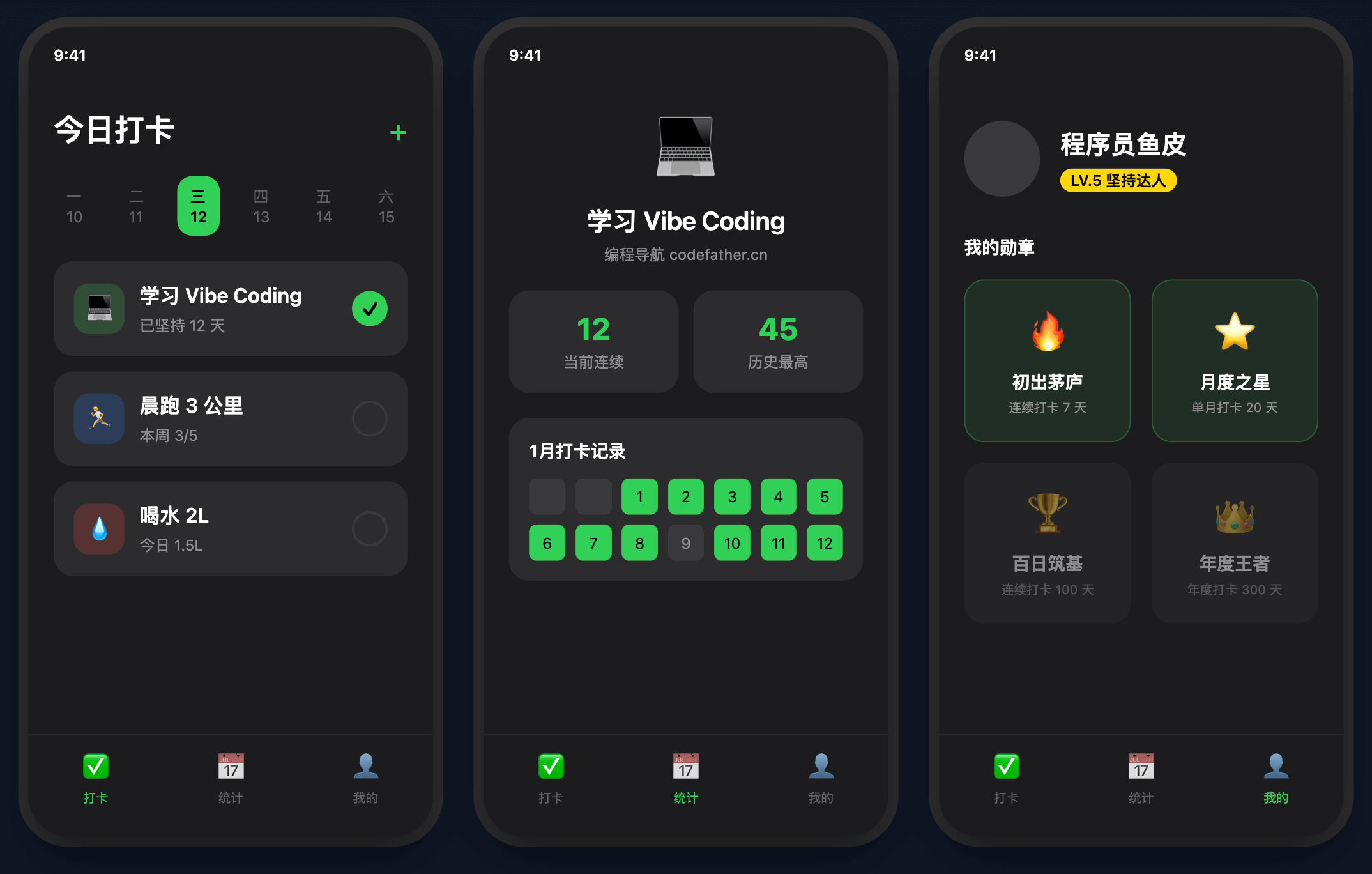
We’ll use WeChat Mini Program native development, with data stored locally. Calendar components can use third-party libraries like Vant Weapp or be implemented manually.
Development Steps
- The first step is to design the data structure. Tell the AI:
I want to develop a habit tracker Mini Program. Please help me design the data structure.

Habit Project:
- id
- name (project name, e.g., "Daily Study")
- target (goal days)
- created_at (creation time)

Check-in Record:
- id
- project_id (associated project)
- date (check-in date, format YYYY-MM-DD)
- note (check-in note, optional)
- created_at (check-in time)

Please provide the data structure and storage solution.
The AI will help you design a reasonable data structure and explain how to store it locally.
- Create the project list page
Tell the AI:
Create the home page (pages/index/index), displaying a list of habit projects:

Each project card shows:
- Project name
- Whether checked in today (checked in shows a green check, unchecked shows a gray circle)
- Consecutive check-in days
- Total check-in days
- Progress bar (check-in days / goal days)

Bottom section has an "Add Project" button.

Clicking a project card navigates to the project details page.
Clicking the check-in button performs a check-in.
This prompt details the layout and interaction of the home page. The AI will generate complete page code.
- Implement the check-in feature
Tell the AI:
Implement the check-in feature:

1. Check if checked in today
2. If not checked in, create a check-in record
3. Save to local storage
4. Display a success message
5. Refresh page data

Optionally, add a note when checking in.
The check-in feature should prevent duplicate check-ins, so first check if the user has already checked in today.
- Create the project details page
Tell the AI:
Create the project details page (pages/detail/detail):

Top section displays project information:
- Project name
- Goal days
- Check-in days
- Consecutive check-in days

Middle section displays a calendar:
- Shows the current month
- Checked-in dates marked in green
- Today marked with a blue border
- Can switch months

Bottom section displays the check-in record list:
- Sorted by date in descending order
- Shows date and notes

Top-right corner has a delete project button.
- Implement the statistics feature
Tell the AI:
Implement the statistics feature:

1. Total check-in days: Total check-in records for the project
2. Consecutive check-in days: Number of consecutive days checked in, starting from today
3. Completion rate: Check-in days / goal days
4. Longest consecutive check-in: Longest streak in history

Display these statistics on the project details page.
Calculating consecutive check-in days is complex—you need to traverse backward from today, checking if each day has a check-in record until you encounter a day without one. The AI will help you implement this algorithm.
- Implement the calendar component
Tell the AI:
Implement the calendar component:

1. Display all dates in the current month
2. Mark checked-in dates with a green background
3. Mark today with a blue border
4. Can switch to previous/next month
5. Clicking a date shows the check-in note for that day

Use Grid layout, with 7 dates per row (Sunday to Saturday).
Implementing the calendar component is complex, but the AI can handle it. If it feels too cumbersome, you can use third-party libraries like Vant Weapp.
Development Tips
When developing the habit tracker Mini Program, here are a few tips to keep in mind. First, date handling in JavaScript can be tricky. Let the AI help you encapsulate some utility functions, such as getting the number of days in a month, checking if a date is today, or calculating the difference between two dates.
Second, calculating consecutive check-in days requires traversing backward from today, checking if each day has a check-in record until you encounter a day without one. Let the AI implement this algorithm, considering various edge cases.
Additionally, implementing the calendar component is complex. If it feels too cumbersome, use third-party libraries. Vant Weapp is an excellent Mini Program UI library that provides a calendar component. Let the AI help you integrate Vant Weapp and use its calendar component.
Finally, check-in data may accumulate over time, so be mindful of performance optimization. Load only the last three months of data initially, and load older data on demand to avoid performance issues from loading too much data at once.
Extension Ideas
After completing the basic version, you can extend the functionality. For example, add check-in reminders to notify users daily; implement check-in sharing to generate posters for sharing on social media; add leaderboards to compete with friends; implement rewards for consecutive check-ins; support data export to export check-in records; integrate cloud sync using WeChat Cloud Development for multi-device synchronization.
4. Mini Program Launch Process
After development, how do you launch a Mini Program? Here’s a detailed explanation of the launch process.
- Complete Mini Program Information
On the WeChat Official Platform, complete the Mini Program’s basic information: name, description, logo, and category (choose an appropriate category). Personal-type Mini Programs have some restrictions, such as not being able to use payment features or certain categories. If you need these features, register as an enterprise-type account.
- Configure Server Domain
If the Mini Program needs to call backend APIs, configure the server domain on the WeChat Official Platform. Only configured domains can be accessed in the Mini Program. Note that the domain must use HTTPS and have an SSL certificate. For local development, you can check "Do not verify valid domain names" in the developer tools.
- Upload Code
In WeChat Developer Tools, click the "Upload" button in the top-right corner, fill in the version number and project notes, and click "Upload." After uploading, the code will be submitted to WeChat’s servers.
- Submit for Review
On the WeChat Official Platform, go to "Version Management" to see the uploaded version. Click "Submit for Review" and fill in the review information, including test accounts (if login is required), test instructions (tell reviewers how to test), and privacy-related explanations. After submission, wait for the review. The review time is typically 1–7 days, but it usually takes 1–2 days to pass.
- Launch
After passing the review, you’ll receive a notification. On the WeChat Official Platform, click the "Launch" button, and the Mini Program will officially go live. After launch, users can access your Mini Program via search, QR codes, or sharing.
- Version Updates
To update the Mini Program, repeat the process: upload code → submit for review → launch. You can use the "Staged Release" feature to release the update to a subset of users first and then roll it out fully after testing.

Common Review Issues
Mini Program reviews may encounter some issues. Here are a few common ones.
-
Incomplete functionality. Reviewers may find that features don’t work as expected, such as buttons not responding or pages displaying errors. Ensure all features work correctly and test thoroughly before submission.
-
Incorrect category. The Mini Program’s functionality may not match the selected category. For example, if you’re developing a utility Mini Program but selected a social category. Choose the appropriate category, and consult WeChat support if unsure.
-
Missing necessary explanations. For example, if the Mini Program requires user location but doesn’t explain why. Clearly state the purpose and usage of such permissions in the privacy policy.
-
Content violations. The Mini Program’s content may violate WeChat’s guidelines, such as containing inappropriate material. Carefully read WeChat’s Mini Program operational guidelines to ensure compliance.
If the review fails, you’ll receive the rejection reason. Make the necessary changes and