 yupi-translate-app[bot]
19 KiB
Vibe Coding Code Quality Assurance
How to Ensure the Quality of AI-Generated Code
Hello, I'm Yupi.
Many students have concerns when using AI for development: Is the code generated by AI reliable? Could there be hidden bugs?
This concern is valid. While AI can quickly generate code, it doesn't guarantee the quality of the code. As a developer, you need to establish a quality assurance system.
In this article, I'll share some practical methods to help you ensure the quality of AI-generated code.
1. What is Good Code?
Before discussing how to ensure quality, we first need to define what good code is.
Characteristics of Good Code
What kind of code can be considered good code?
This question seems simple, but many people can't clearly articulate it. In fact, besides being functional, the most important aspect of good code is readability: the code should be clear, easy to understand, and conform to team development standards, allowing others (including your future self) to quickly grasp it. On top of that, it should be maintainable, making modifications and extensions easy without causing a ripple effect.
Of course, all of this must be based on correct functionality, meaning the code correctly implements the requirements without bugs. Additionally, performance should be reasonable, completing tasks within an acceptable time frame without wasting resources. Moreover, the code should be secure and reliable, free from security vulnerabilities and capable of handling exceptional situations.

Common Issues with AI-Generated Code
So, what are the common issues with AI-generated code?
Based on my experience, the most common issue is over-complexity. AI often writes unnecessary code to implement functionality. Another common issue is lack of boundary handling. AI may focus only on normal cases to ensure the code runs quickly, ignoring edge cases like null values or errors.
AI-generated code also frequently suffers from code duplication. Especially in front-end development, if you ask AI to generate multiple similar pages separately, it won't proactively reuse code but instead generate independent code for each page.
For example, suppose you're building an admin dashboard with a user list page, an article list page, and a comment list page. These three pages have similar layouts and functionalities: they all display data in tables, have search boxes, and include pagination. But if you ask AI to generate them three times, it will produce three nearly identical sets of code, differing only in data fields. A better approach is to first ask AI to generate a generic list component and then reuse it with different configurations. This not only reduces code volume but also makes maintenance easier.
Sometimes there are also performance issues, such as using inefficient algorithms or data structures. Understanding these issues allows you to check and improve them more effectively.
Establishing Quality Standards
Once you know what good code is, the next step is to establish clear quality standards for your project.
In terms of code style, it's recommended to use ESLint or Prettier to unify code formatting, define clear naming conventions (e.g., camelCase for variables, UPPER_SNAKE_CASE for constants), and specify file and folder organization.
For functionality, require that all features have tests, handle edge cases, and provide user-friendly error messages.
For performance, set specific metrics, such as page load time not exceeding 3 seconds, API response time not exceeding 1 second, and using virtual scrolling for large datasets.
You can document these standards in your project documentation so that AI is also aware of them.
💡 However, be flexible in actual development. If you're just building a small demo project, go ahead without overthinking it.
2. Code Review
Code review is the first line of defense in ensuring quality.
Why Review AI-Generated Code?
Some students think: If the AI-generated code works, why bother reviewing it?
This mindset is quite dangerous.
First, AI is not perfect; it can make mistakes and generate buggy code. More importantly, AI only knows technology—it doesn't understand your specific business logic. The code it generates may be technically sound but logically flawed in the context of your business.
Additionally, AI may focus only on current functionality without considering future extensibility. Code that works today may become technical debt tomorrow. Moreover, reviewing code is a learning opportunity that helps you understand how the code works and improves your technical skills. Therefore, reviewing AI-generated code is essential, especially for students with programming experience.

Key Focus Areas for Review
So, what should you focus on when reviewing AI-generated code?
1. Functional Correctness
The most basic requirement is: Does the code correctly implement the requirements?
This sounds simple but is easily overlooked. You need to run the code, test all functionalities, and try various inputs, including normal and edge cases.
Pay special attention to boundary conditions, such as null values, maximums, minimums, etc., as these are often hotspots for bugs.
For example:
// AI-generated code
function divide(a: number, b: number): number {
  return a / b;
}
What's the issue with this code?
The answer: It doesn't handle division by zero.
// Improved version:
function divide(a: number, b: number): number {
  if (b === 0) {
    throw new Error('Divisor cannot be zero');
  }
  return a / b;
}
2. Code Readability
After ensuring functional correctness, the next step is to check if the code is readable.
Remember, code is written for humans, not just machines.
Ask yourself these questions when reviewing:
- Are variable names clear?
- Do function names accurately describe their functionality?
- Is the logic easy to understand?
- Are comments necessary?
If you find the code confusing, others will too.
For example:
// Poor naming
function f(x: number): number {
  return x * 2 + 1;
}

// Good naming
function calculateDiscountedPrice(originalPrice: number): number {
  const discount = 0.2; // 20% discount
  return originalPrice * (1 - discount);
}
3. Error Handling
The code should gracefully handle errors and not crash when something goes wrong.
Check if API calls have error handling, if user inputs are validated, and if exceptions are handled with user-friendly messages. Many AI-generated codes only consider the happy path and completely ignore error handling, which is risky.
For example:
// Poor error handling (none at all)
async function fetchUser(id: string) {
  const response = await fetch(`/api/users/${id}`);
  const user = await response.json();
  return user;
}

// Good error handling
async function fetchUser(id: string) {
  try {
    const response = await fetch(`/api/users/${id}`);

    if (!response.ok) {
      throw new Error(`Failed to fetch user: ${response.statusText}`);
    }

    const user = await response.json();
    return { data: user, error: null };
  } catch (error) {
    console.error('Error fetching user:', error);
    return { data: null, error: error.message };
  }
}
4. Performance Issues
Next, consider performance. The code should be efficient and not waste resources.
Look for unnecessary loops, repeated calculations, and whether the chosen data structures are appropriate. Sometimes, AI chooses the simplest but not the most efficient solution to quickly implement functionality.
For example:
// Poor performance
function findUser(users: User[], id: string): User | undefined {
  // Traverses the entire array each time, O(n)
  return users.find(user => user.id === id);
}

// Better performance
class UserManager {
  private userMap: Map<string, User>;

  constructor(users: User[]) {
    // Uses Map for O(1) lookup
    this.userMap = new Map(users.map(u => [u.id, u]));
  }

  findUser(id: string): User | undefined {
    return this.userMap.get(id);
  }
}
5. Security Concerns
For commercial projects, this is crucial. The code must be secure and free from vulnerabilities.
Check for SQL injection risks, XSS attack risks, whether sensitive information is encrypted, and if API keys are exposed. AI's understanding of security may not be deep enough, often leaving security holes.
Take SQL injection as an example. SQL injection occurs when an attacker inserts malicious SQL code into input fields to execute unintended database operations.
For instance, the following code is insecure:
// ❌ Insecure: Directly concatenates user input
const query = `SELECT * FROM users WHERE name = '${userName}'`;
If a user inputs admin' OR '1'='1 as the username, the SQL query becomes:
SELECT * FROM users WHERE name = 'admin' OR '1'='1'
This query returns all users because '1'='1' is always true. The attacker can bypass authentication and log in as any account.
The correct approach is to use parameterized queries:
// ✅ Secure: Uses parameterized queries
const query = 'SELECT * FROM users WHERE name = ?';
db.execute(query, [userName]);
Parameterized queries automatically escape special characters, preventing SQL injection.
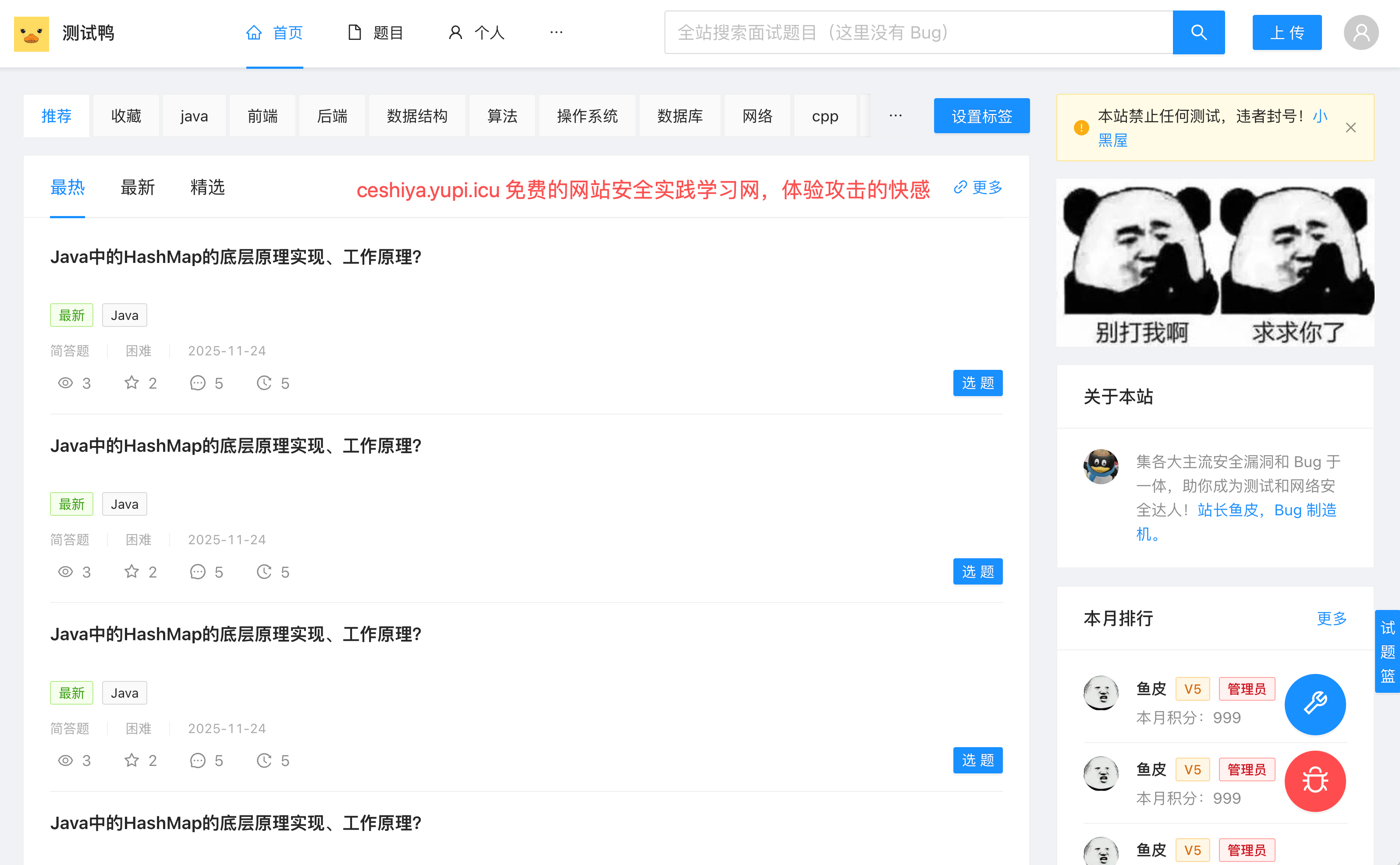
If you're interested in web security, you can learn more using Yupi's free cybersecurity self-study website:
Review Process
You can follow these steps to establish a systematic review process:
-
Initial Review: Quickly skim through the code to spot obvious issues.
-
Run Tests: Test all functionalities, including edge cases.
-
Line-by-Line Review: Carefully inspect each line of code, thinking about potential issues.
-
Record Issues: Document any problems found.
-
Request AI Improvements: Provide feedback to AI and ask it to fix the issues.
-
Re-review: Confirm that the fixed code doesn't introduce new problems.
This process may seem tedious, but it significantly improves code quality.
For those without programming experience, if you can't understand the code, you can use other AI models to assist in the review. This is a practical technique: cross-validation with multiple AIs.
For example, if you generate code with Cursor (Claude), you can copy it into ChatGPT or Gemini and ask them to review it:
Please review this code and identify potential issues, including bugs, performance problems, and security risks.
Different AIs have different perspectives and training data, complementing each other. An issue overlooked by one AI might be caught by another.
When working on important projects, I often have 2–3 different AIs review the same code and then synthesize their suggestions. While this takes a bit more time, it greatly reduces the risk of errors. Especially for critical business logic, security-related code, and performance-sensitive parts, an extra layer of assurance is always beneficial.
3. Testing
Testing is a key method for ensuring code quality.
Why Write Tests?
Many students think writing tests is a waste of time, but in fact, the opposite is true. Tests can catch issues during the development phase, rather than after deployment when users encounter them. With tests, you can confidently refactor code without fear of breaking things. Moreover, test code itself serves as excellent documentation, demonstrating how your functions or components should be used.
Additionally, while writing tests takes time, it saves more debugging time. Think about it: if you manually test all functionalities every time you modify code, how much time would that take? With automated tests, you can run them to quickly identify any issues.
Therefore, writing tests is worthwhile.

Types of Tests
There are mainly three types of tests.
- Unit Tests: Test individual functions or components. They are fast, easy to pinpoint issues, and should have high coverage.
- Integration Tests: Test the collaboration between multiple modules, ensuring that interfaces between modules are correct and covering main workflows.
- End-to-End Tests: Simulate complete user operations, testing the entire system and covering critical scenarios.
For Vibe Coding projects, I recommend focusing on unit tests and integration tests. While end-to-end tests are also important, they are more costly and should only cover the most critical scenarios.
Let AI Write Tests for You
Nowadays, most test code doesn't need to be written manually—you can directly ask AI to generate it.
Please write unit tests for this function, covering normal and edge cases:
```typescript
function calculateTotal(items: CartItem[]): number {
  return items.reduce((sum, item) => sum + item.price * item.quantity, 0);
}
```
AI will generate test code like this:
import { describe, it, expect } from 'vitest';

describe('calculateTotal', () => {
  it('should correctly calculate the total price', () => {
    const items = [
      { price: 10, quantity: 2 },
      { price: 5, quantity: 3 }
    ];
    expect(calculateTotal(items)).toBe(35);
  });

  it('should handle an empty array', () => {
    expect(calculateTotal([])).toBe(0);
  });

  it('should handle zero quantity', () => {
    const items = [{ price: 10, quantity: 0 }];
    expect(calculateTotal(items)).toBe(0);
  });

  it('should handle decimal values', () => {
    const items = [{ price: 10.5, quantity: 2 }];
    expect(calculateTotal(items)).toBe(21);
  });
});
This test code uses describe to define a test group (testing the calculateTotal function) and multiple it statements to define specific test cases. Each test case calls the function and checks if the result matches the expected value. For example, the first test checks normal cases, the second checks empty arrays, the third checks zero quantities, and the fourth checks decimal values. When running these tests, if all expect statements pass, the function works correctly; if any fail, there's an issue in the code.
With these tests, you can ensure the function works correctly under various conditions.
Extended Knowledge - Test-Driven Development (TDD)
You can try Test-Driven Development (TDD), a development approach where you "write tests first, then write code."
This sounds counterintuitive, right? Isn't it usually the other way around—write code first, then write tests?
But TDD's logic is: You first define how the function should behave (write tests), and then let AI implement the functionality based on the tests. This ensures the code meets requirements and is testable from the start.
The specific process is:
- Write a failing test (since the functionality isn't implemented yet).
- Let AI implement the functionality to make the test pass, and run the tests to ensure all pass.
- Finally, optimize the code while keeping the tests passing.
This approach helps avoid writing code that "seems to work but actually has issues."
4. Advanced Debugging Techniques
Even with reviews and tests, bugs are inevitable. When they occur, you need to master debugging techniques.
1. Using Breakpoint Debugging
Many students debug code by only using console.log, which involves adding a line like console.log(variableName) to print the variable's value and then checking it in the browser console.
While this method is simple, it's inefficient, and you have to delete these logs after debugging.
Breakpoint debugging is much more efficient. In VS Code or Cursor, you simply click to the left of the line number to set a breakpoint and press F5 to start debugging.
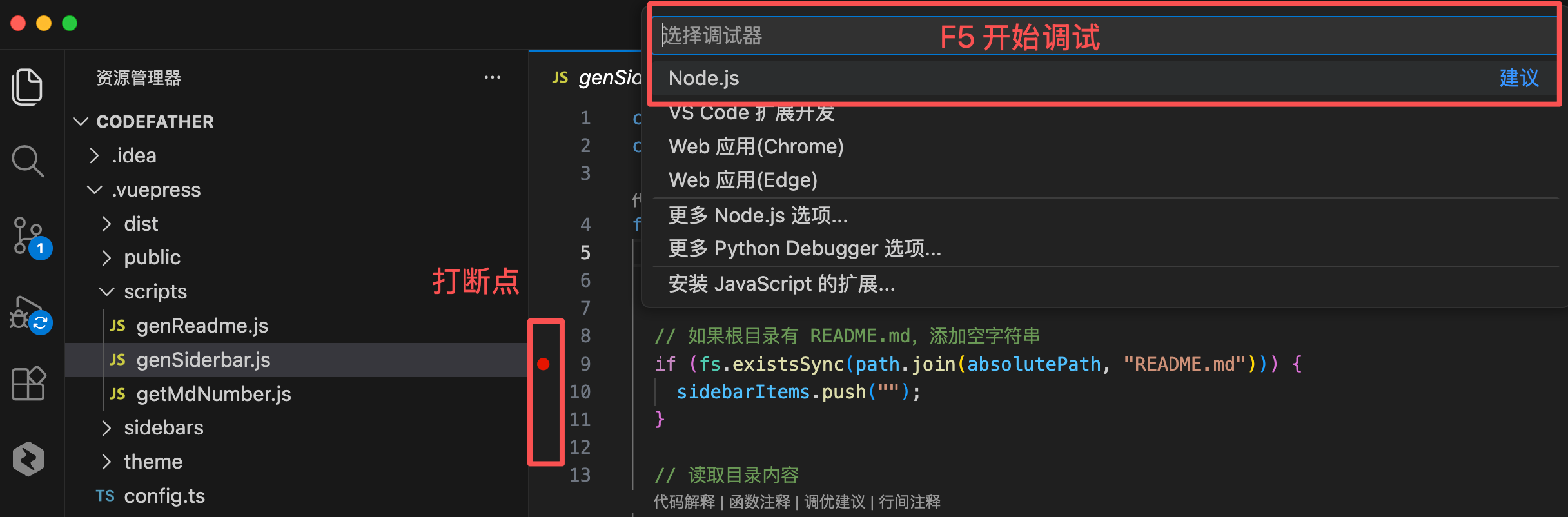
The code pauses at the breakpoint, allowing you to inspect all variable values:
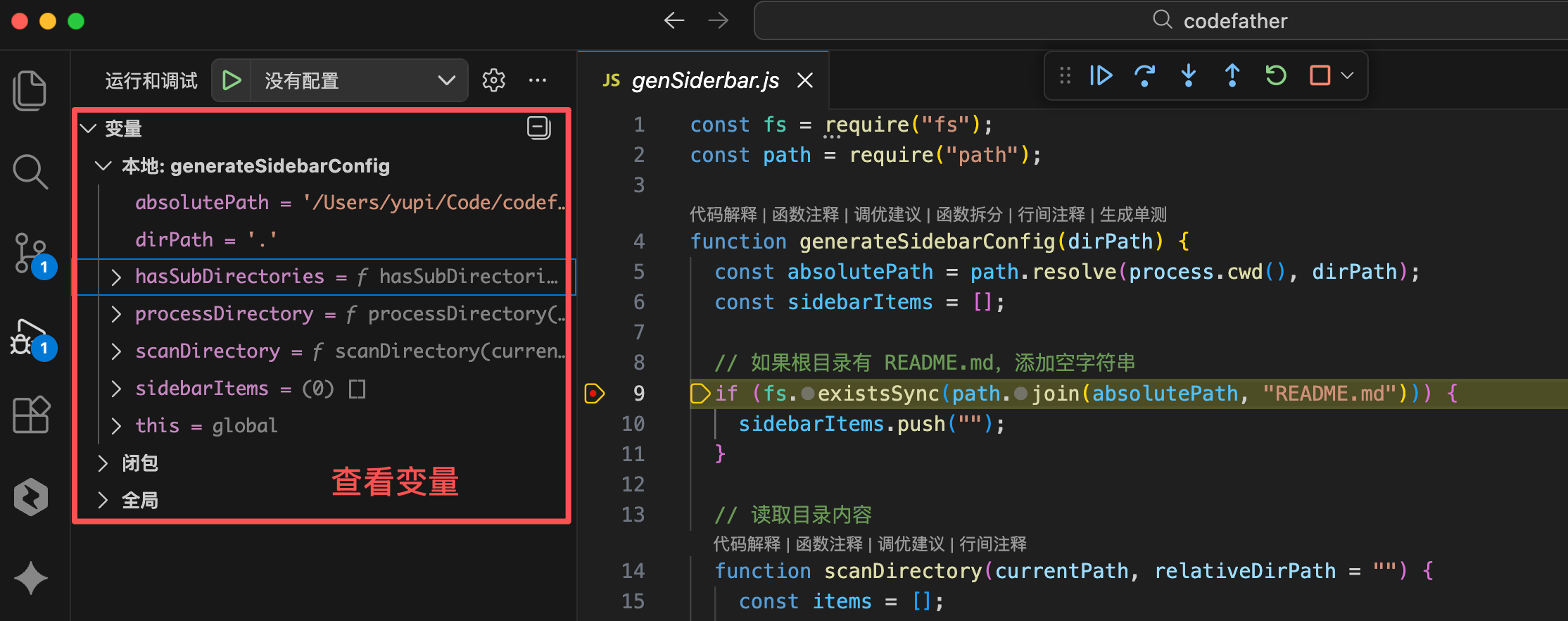
You can also step through the code to see what happens at each step. This is far more convenient than scattering console.log statements and then deleting them.
2. Browser Debugging Tools
When developing front-end applications, browser debugging tools are your best friends. Press F12 in the browser to open the developer tools.
Here are some commonly used panels:
- Console Panel: View logs and errors, execute JavaScript code, inspect variable values.
- Sources Panel: Set breakpoints, step through code, view call stacks.
- Network Panel: Inspect API requests, check request and response details, analyze load times.
- Performance Panel: Analyze performance bottlenecks, view rendering times, identify slow operations.
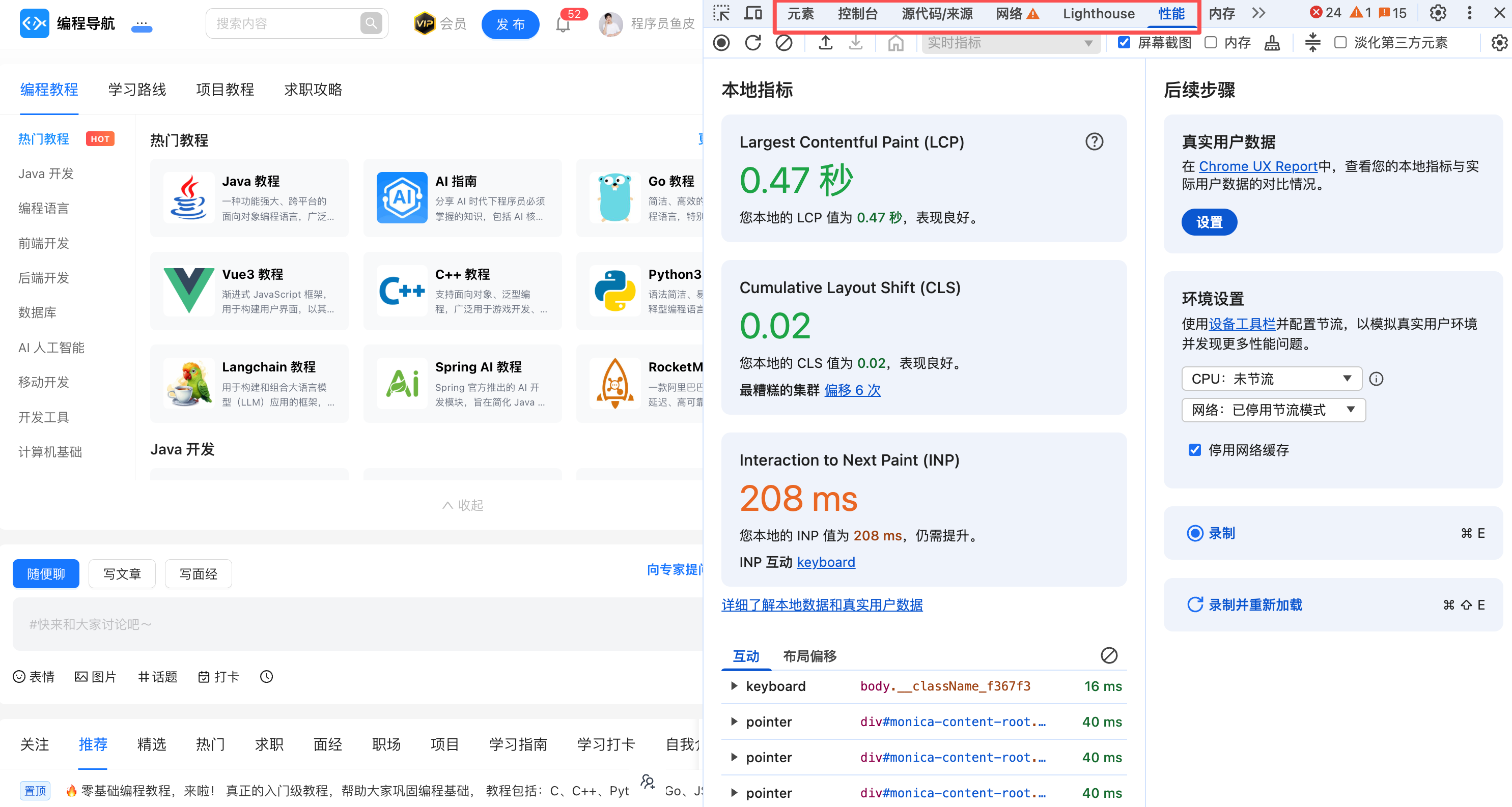
Mastering these tools will significantly improve your debugging efficiency.
3. Binary Search for Problem Localization
If you're unsure where the problem lies, try the binary search method.
It's straightforward: Simply divide the code into two halves, comment out one half, and see if the problem persists. If it does, the issue is in the other half; if not, it's in this half. Repeat this process until you locate the problem.
This method, while simple, is highly effective, especially when dealing with large chunks of code.
4. Rubber Duck Debugging
This is a seemingly quirky but scientifically grounded method.
When you're stuck on a bug, try explaining your code to someone (or a rubber duck): Blah blah, this function should do this… it first does this… then does that… Hmm, something seems off here…
Interestingly, during the explanation, you often discover the problem. The act of explaining forces you to rethink and view the problem from different angles.
Which programmer doesn't have a little yellow duck?

5. Let AI Help You Debug
Provide the error message and relevant code to AI, and ask it to analyze:
This code is throwing an error:
```
TypeError: Cannot read property 'map' of undefined
```

The code is:
```typescript
function UserList({ users }) {
  return (
    <div>
      {users.map(user => <UserCard key={user.id} user={user} />)}
    </div>
  );
}
```

Please help me analyze the issue and provide a solution.
AI will tell you that the issue might be users being undefined and suggest a solution.
This is undoubtedly the most commonly used method by students, but it's not 100% effective. Try it first, and if it doesn't work, handle it manually.
5. Quality Checklist
You can create a quality checklist and have AI + humans review it before submitting code.
However, as