 yupi-translate-app[bot]
17 KiB
My Practical Experience as a Personal Website Owner
The Complete Process from Development to Operation
Hello, I'm Yupi the programmer.
I've been a personal website owner for over 8 years since launching my personal blog during university. Throughout this journey, I've gained a lot. Beyond the joy of technical growth, the most rewarding aspect of being a personal website owner is having users engage with and praise your site—it's truly fulfilling.
Of course, there have been many painful moments along the way, such as website attacks, database breaches, and endless user-reported bugs. However, looking back now, enduring these hardships has turned out to be a form of "happiness." On one hand, these experiences have helped me grow and enriched my expertise; on the other hand, being targeted by attacks and receiving bug reports indicates that your website has garnered some level of attention.
But the most painful thing about being a personal website owner is: putting your heart into a website that no one uses. I believe many friends who own their own websites can relate to this feeling.

Recently, I've also spent a significant amount of energy leading a team to develop and optimize the Programming Navigation website, gaining even more experience.
Programming Navigation - Learning and Exchange Community: https://codefather.cn
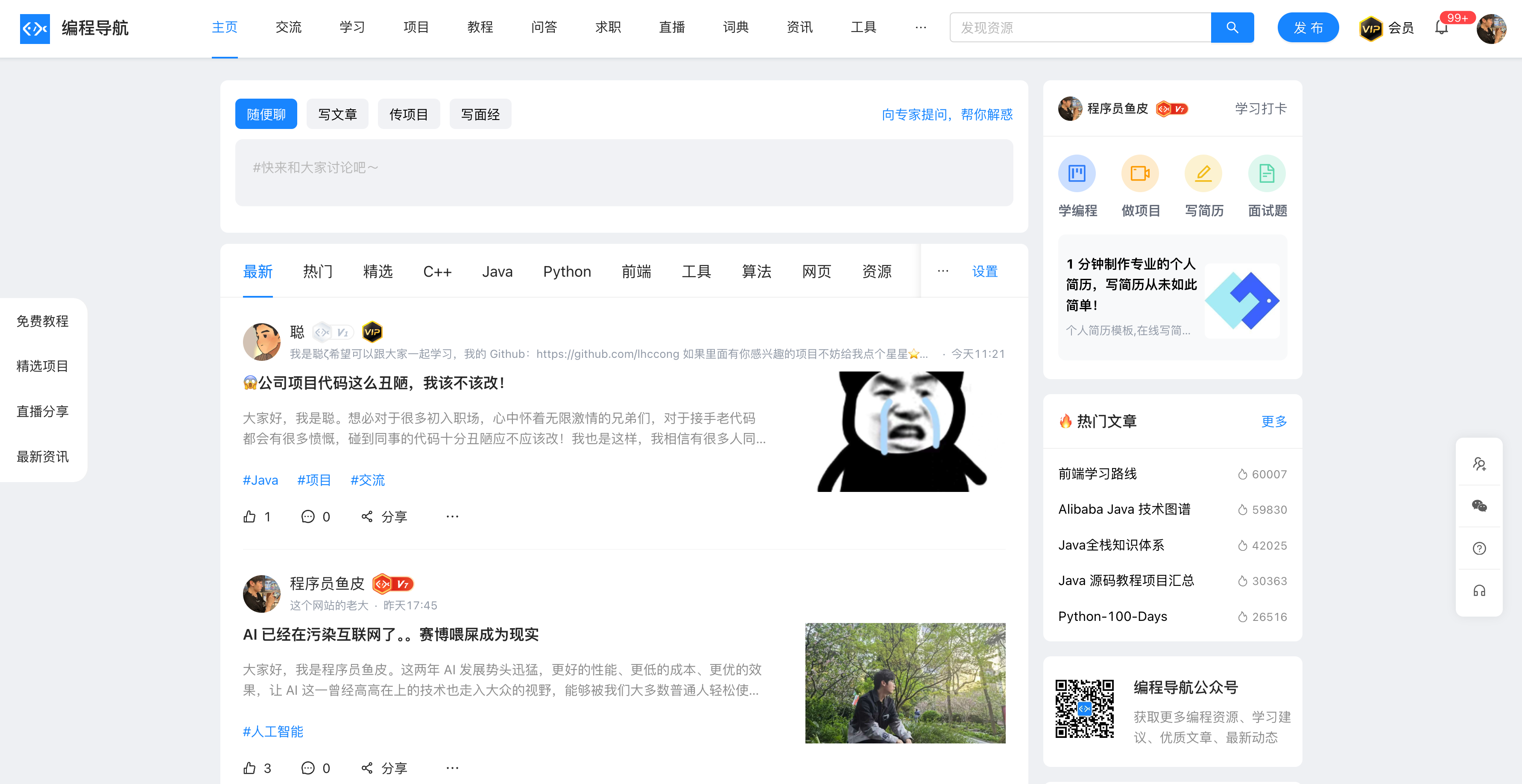
In this article, I'll use the Programming Navigation website as an example to share the tasks involved in becoming a personal website owner and some of my practical experiences. I hope this will be helpful for friends who aspire to become independent developers.
How to Become a Personal Website Owner?
Want to become a personal website owner? Want to create a successful personal website? Here are the essential steps you need to take.
You can also treat this section as a guide to the "website development process."
1. Start with an IDEA
What are you going to do?
Defining the website's goal and core value is the first step in creating a website. Ideas are the most valuable—a good IDEA is the key to a website's success.
Note, a good idea isn't something you ask others for. I once encountered a rather amusing question: "Yupi, Yupi, I want to start a business project. What should I do?"
If someone had a good IDEA, why wouldn't they pursue it themselves instead of sharing it with you for free?
How do you come up with an IDEA? Here are two methods I use:
- Start from your own needs—think about what you require. For example, school course registration is a need.
- Look at other websites for inspiration and areas for improvement. Ask yourself: What could existing websites do better? For instance, many friends complain about WeChat taking up too much space. Could you develop something better? You might just become the next pony 🐴.
For example, my Programming Navigation IDEA originated from the issues my readers faced over years of sharing programming knowledge—low learning efficiency, scattered resources, lack of interaction, and no motivation. So our goal is: to provide a one-stop programming learning and exchange community, guiding you on your programming journey.
2. Product Prototype
Once you have an IDEA, start envisioning: What should the website look like? What core features should it have? Typically, you'll need to draft a detailed product design plan and create product prototype diagrams.
In a company, this is usually the product manager's job, but as a personal website owner, you are the product manager—you decide what the website will look like!
First, outline the website's functional modules. You can use a mind map or a list to present them. For example, our Programming Navigation's functional module design includes:
- User Module: Includes user registration, login, and profile management.
- Article Module: Allows users to publish, edit, and read articles.
- Message Module: Notifies users of new comments and updates.
- Search Module: Aggregates searches for all articles and resources.
- Tutorial Module: Offers free and paid learning tutorials, supporting column reading and video playback.
After confirming the functional modules, design product prototype diagrams for each feature. Don't worry if you lack professional product knowledge or thinking—this can be developed. You can learn by observing, imitating, or even borrowing features and designs from successful websites to quickly complete your product prototype.
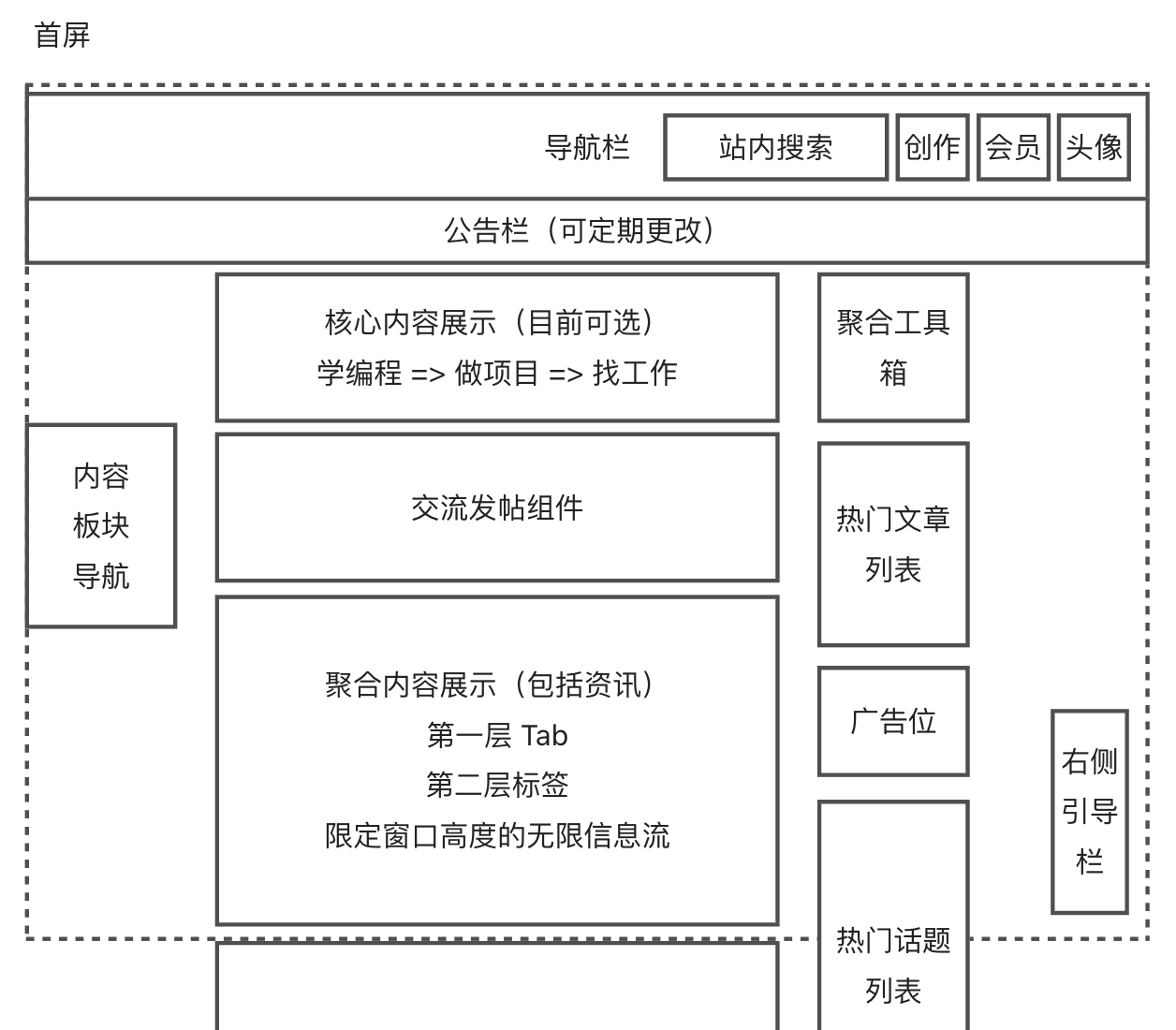
I drew the homepage prototype for Programming Navigation myself using Yuku's built-in drawing board or draw.io:
3. Requirement Analysis
After completing the product prototype, you'll find a long list of features to develop.
Don't panic—this is when we conduct requirement analysis and scheduling: Which requirements need to be implemented? Which ones should be prioritized?
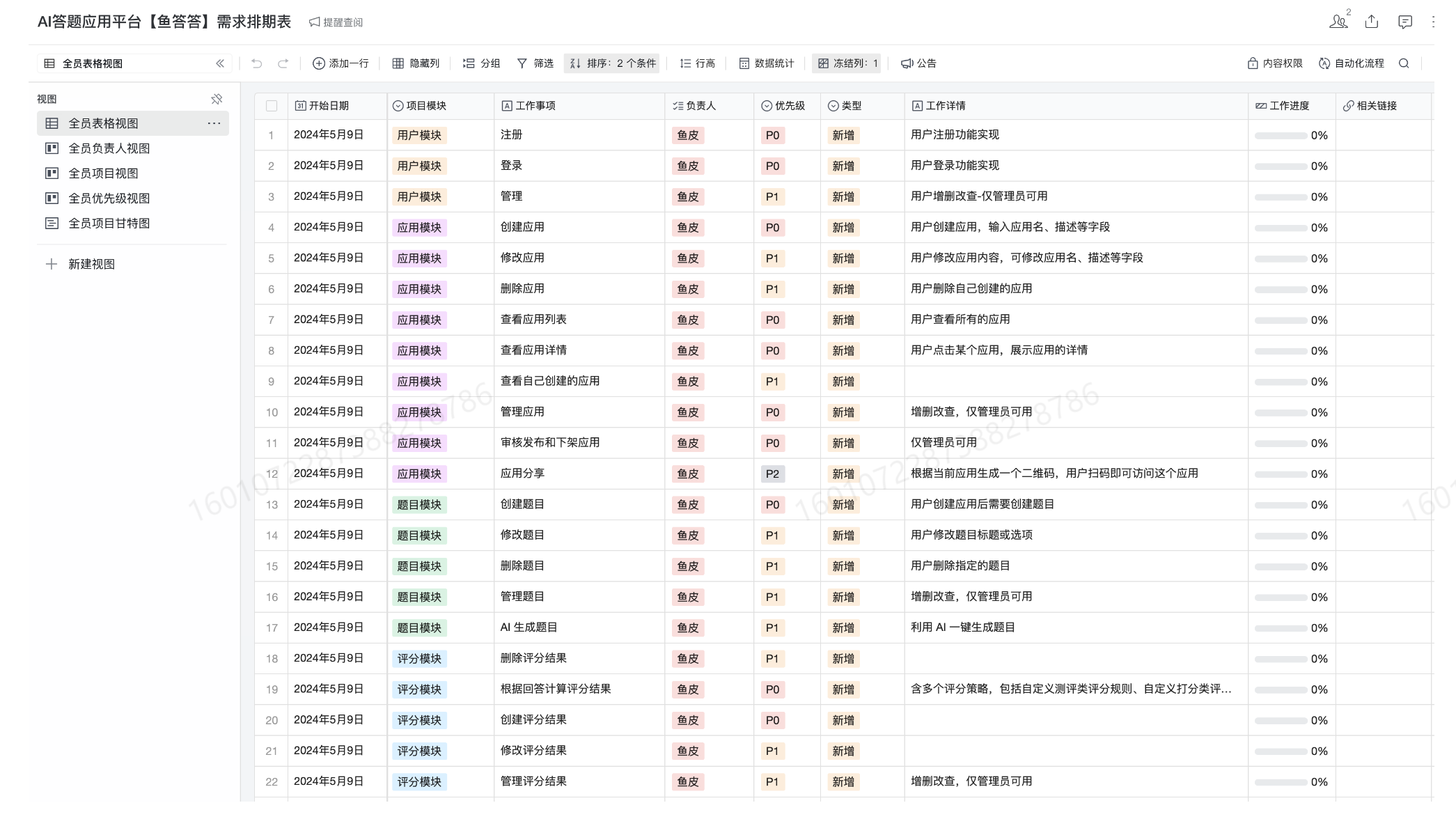
For team development, the product manager usually organizes a requirement review meeting with developers, testers, designers, and other roles to discuss. For personal website development, there's no need for meetings or professional requirement management tools—it's just extra hassle. Instead, create a requirement schedule, prioritizing all features that need to be implemented. Determine which ones must be completed first and which can be deferred to later iterations. For large functional modules, break them into smaller tasks for agile development and orderly progress.
Here's an example of a requirement schedule from a new project I led in June:
4. Preliminary Design
Once requirements are clear, it's time to start multitasking. Designers need to create design drafts, testers need to design test cases, and developers need to conduct technical selection and solution design.
As a personal website owner, you'll need to handle all these tasks yourself. If you're a programmer, my suggestion is to reference other websites rather than designing everything from scratch in the early stages. Focus on completing features and getting users to engage with the product before refining the details. There's no need to follow a standard development process by designing test cases—just verify functionality manually after completing features. However, technical selection and solution design must be done carefully. It's best to create a detailed document outlining the implementation plan and specifics to avoid discovering issues or feasibility problems during development.
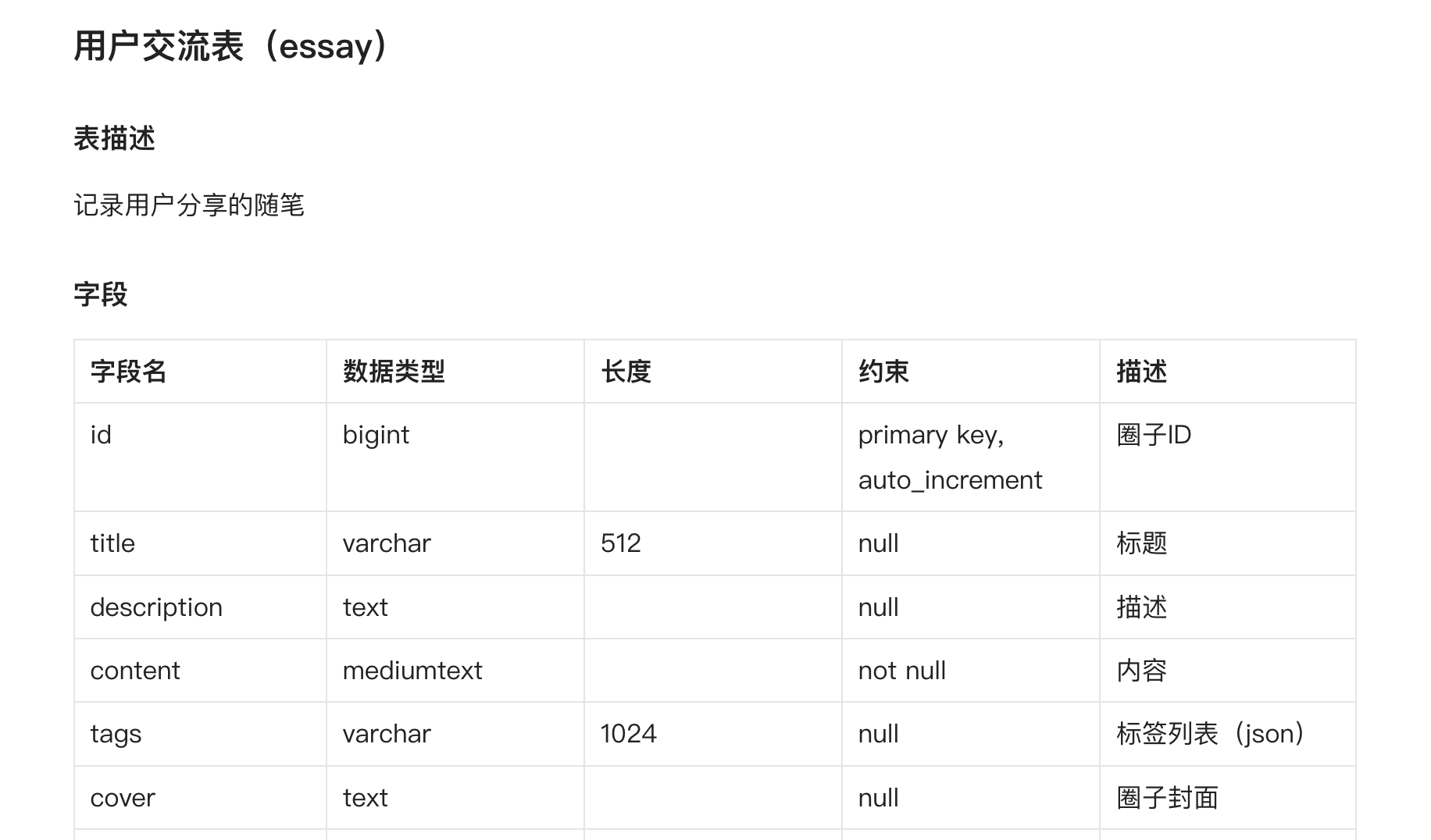
Technical solution design includes core implementation plans, detail confirmation, database table design, interface design, etc. For example, the database table design for Programming Navigation's discussion section was confirmed through a solution document before coding began.
5. Development Implementation
This section is familiar territory for programmer friends—it's the bread and butter of technical roles. For website development, it's typically divided into backend and frontend.
5.1 Backend
The backend provides data operation and management capabilities. Backend developers usually need to provide API documentation for frontend developers to reference.
There are many mainstream backend development languages like Java, Go, C++, PHP, C#, etc., and frameworks like Spring Boot (Quarkus) for Java or Gin for Go can improve efficiency.
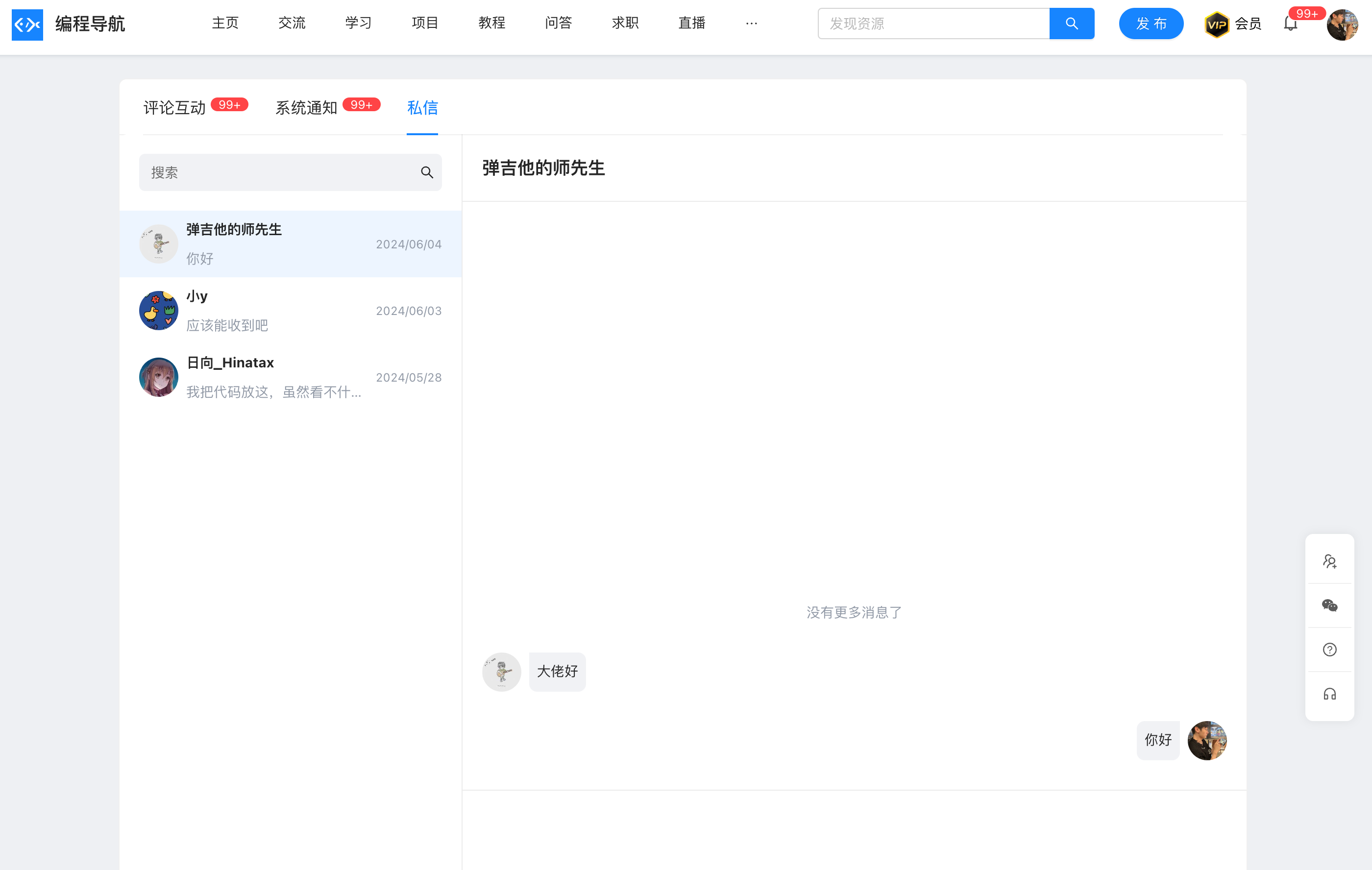
Our Programming Navigation backend is developed using Spring Boot, with most functionalities handled by MySQL, and some features utilizing Redis, WebSocket, etc.
5.2 Frontend
The frontend provides users with interactive pages. Typically, HTML, JavaScript, and CSS are used, along with frameworks like Vue or React to boost development efficiency. Beyond page development, frontend developers also need to consider browser compatibility, page load performance, search engine optimization (SEO), etc.
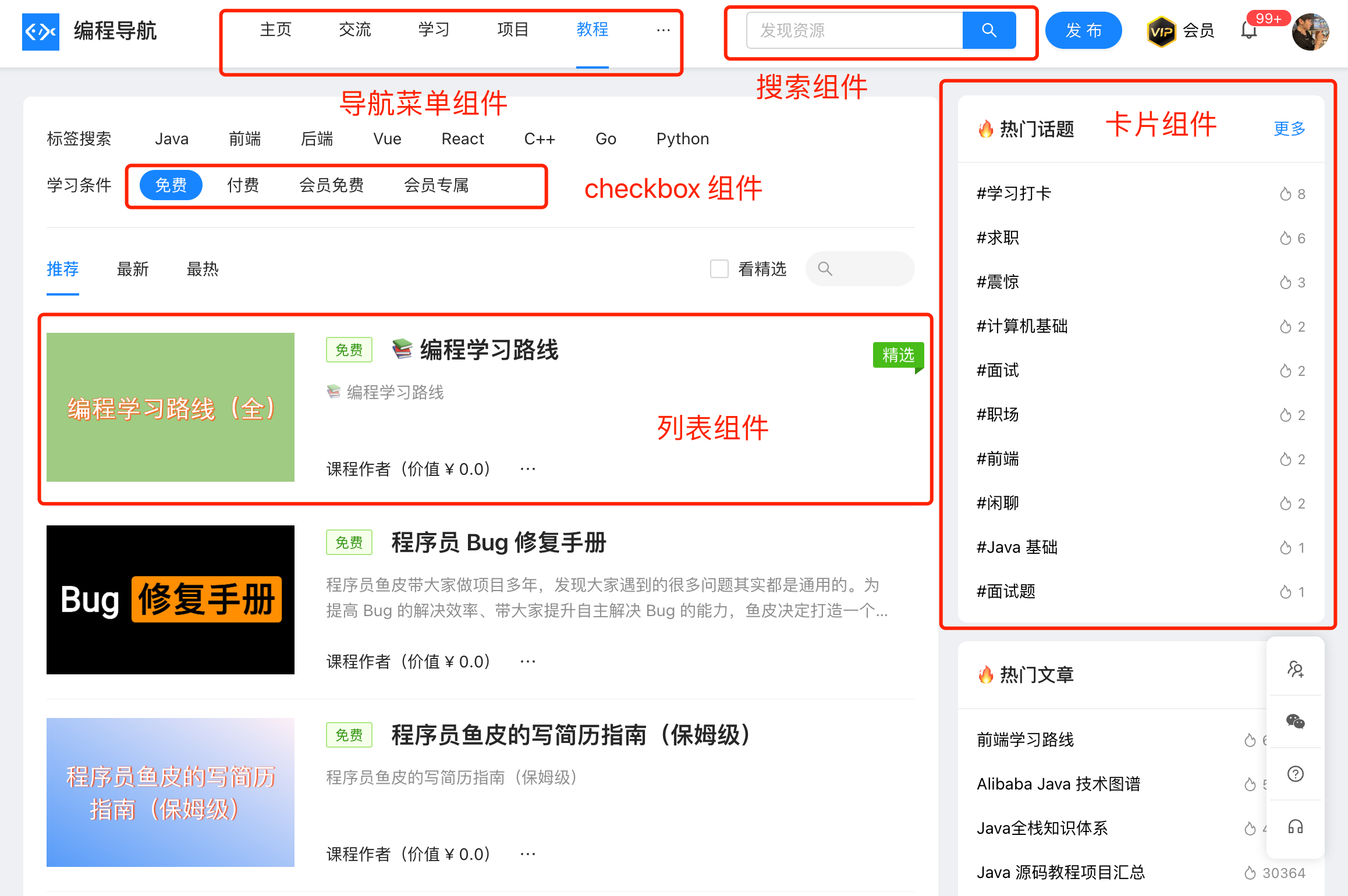
In frontend development, choosing a good component library can significantly improve efficiency. We use Ant Design, which offers comprehensive components, allowing us to assemble pages like puzzles. The downside is that the library is somewhat heavy, so we might optimize it later.
For personal website owners, both backend and frontend development fall on you. My advice is to start with the backend—once the APIs, data, and logic are defined, frontend development becomes much easier. Also, it's better to handle complex logic on the backend to avoid maintaining two sets of logic and potential conflicts.
6. Testing and Validation
After development, multiple rounds of testing are required:
- Developer Self-Testing: Developers perform initial testing to ensure basic functionality works. For example, Java developers can write unit tests with JUnit.
- QA Testing: The quality assurance team conducts detailed testing, including functional, performance, and security tests.
- Product Acceptance: The product manager or requester performs final acceptance to ensure the product meets requirements.
For personal website owners, besides self-testing, you can invite friends to test and help find bugs.
Before officially launching or monetizing a website, thorough internal testing is usually necessary. Some of my past websites didn't undergo sufficient testing, leading to vulnerabilities upon launch. However, if traffic is low and bugs don't cause actual losses, the testing phase can be scaled back, as long as users have a way to report bugs.
7. Deployment and Launch
Deployment and launch involve placing website files on a server so users can access them via a domain.
I've shared various deployment tutorials before—it's not difficult:
- Traditional Server Deployment Tutorial: https://www.bilibili.com/video/BV1eT421i7si
- Container Hosting Platform Deployment Tutorial: https://www.bilibili.com/video/BV1Xm421N7Xj
- Microservices Project Deployment Tutorial: https://www.bilibili.com/video/BV1Cp4y1F7eA
Initially, I recommend using traditional server deployment due to lower costs. Also, start with low server configurations—1 core and 2 GB RAM is sufficient for most personal websites. Don't buy high-configuration machines right away—they won't necessarily boost performance and may waste resources. As traffic grows, consider switching deployment methods or upgrading server configurations.
Regularly monitor server load and resource utilization. Many of my websites use minimal CPU and memory, so I host multiple sites on the same server to improve resource efficiency.

8. Operation and Analysis
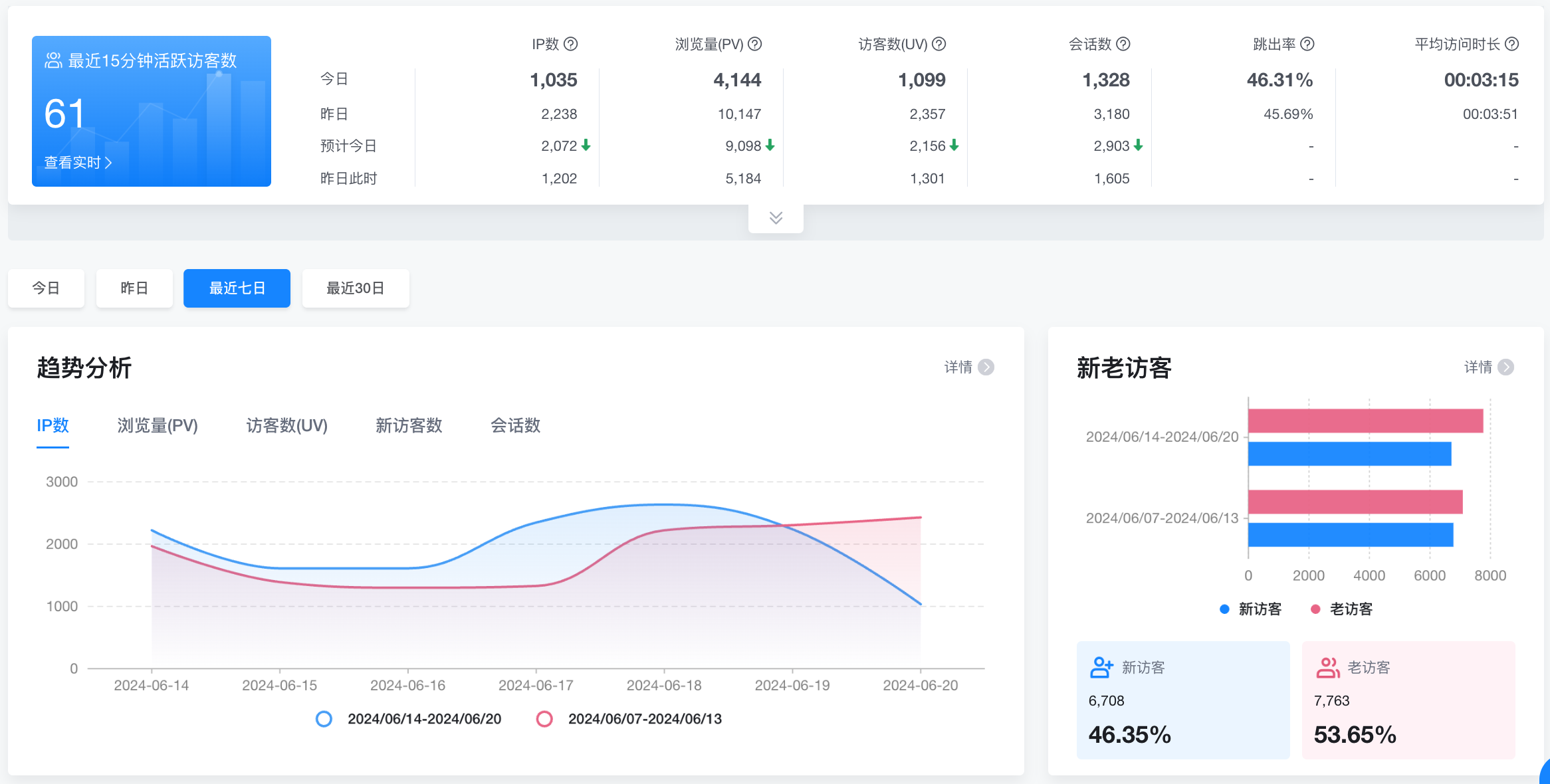
Launching is just the beginning—website owners need to continuously operate the site (e.g., publishing content, organizing events) and monitor and analyze traffic and operational metrics. Tools like Google Analytics, 51.La, and Baidu Statistics can be used for data analysis with just a line of code. These metrics help you understand UV, PV, user sources, feature usage, ad performance, etc., and are crucial for future product improvements and optimizations.
9. Website Optimization
Website optimization is an ongoing process and a great way to enhance technical skills. It involves multiple aspects, such as:
- Product Optimization: Collect user feedback to improve features and user experience.
- Page Design Optimization: Ensure the website design is more aesthetically pleasing and user-friendly.
- Website Performance Optimization: Improve loading speed through code optimization, CDN usage, etc.
- Website Availability Optimization: Ensure 24/7 uptime and avoid downtime.
- Website Cost Optimization: Monitor server resource utilization to optimize costs and avoid waste.
Note, website optimization isn't about guessing—it should be based on aligning with the product's positioning and analyzing actual data and user feedback to determine optimization strategies.
What does this mean?
For example, I once thought website optimization meant constantly adding new features—whatever other websites had, I added. In the end, many features went unused, distracting from focusing on optimizing a single feature to its fullest. Also, users don't always know what they want—not all user suggestions should be implemented. For instance, a user suggested adding a real-time chat room to Programming Navigation. In the past, I might have done it (thinking: it's doable). But now, I'd consider and decline because our platform already has community interaction capabilities, and a real-time chat room would increase management and operational costs—who knows what people might post in the group, right?
Zhang Xiaolong, the head of WeChat, once said: "Every day, 100 million people want to teach me how to make a product." If WeChat blindly followed user suggestions without considering its original purpose and positioning, it would likely be even more bloated than it is now.
If you're unsure about an optimization, conduct user research or use a phased rollout to let a subset of users experience the optimized website and gather feedback to validate the optimization's effectiveness.
10. Website Promotion
During a live stream, I asked everyone: What do you think is the key to a website's success?
Some said: Great product experience.
Others said: Lots of users.
I don't entirely agree. In my opinion, the key to a website's success is: Having users => Making money.
I've seen many well-made products, even comparable to big companies, that ultimately failed. Why? No matter how good your product is, if no one uses it, it's useless. This is what I consider the most painful aspect of being a personal website owner.
Therefore, website promotion is crucial. Here are some methods:
- Content Creation: Write articles, create videos—attract users with quality content.
- SEO Optimization: Improve your website's search engine ranking to attract more organic traffic.
- Ad Campaigns: Invest in ads, collaborate with KOLs, or buy traffic on ad platforms. First, optimize your ad copy to maximize effectiveness before launching campaigns. Monitor ROI (Return on Investment)—if you spend 1 yuan and earn 1.01 yuan, you've succeeded!
Running a website must consider profitability. I know many personal website owners who run their sites purely out of passion, without any profit. Initially, they're enthusiastic, but soon, due to busy schedules or hassle, they abandon their sites. Essentially, they lose motivation and "starve." Most of my websites were completely free, like Free SQL Learning, Free Cybersecurity Learning, Kuangkuang University, SQL Generator, Geek Fan Browser Homepage, etc., and I took pride in offering free websites. However, these sites didn't grow because without income, there was no manpower or energy to maintain updates. Shifting perspective, if a website has paid content that generates profit, enabling you to invest resources and grow the site, wouldn't that be better?
Of course, for a website to profit, it must offer a good user experience. Through continuous optimization, operation, and promotion, a website can evolve and grow larger.
Final Thoughts
By now, you should have a comprehensive understanding of what it takes to be a personal website owner.
Friends often ask me: For programmers, is technology more important or business?
Through this article, I want to say: Technology is foundational—it's your bread and butter. But as your career progresses, non-technical skills become increasingly important.
Skills like product thinking, operational ability, promotional skills, salesmanship, communication, and writing are all honed through the process of being a personal website owner.
Programmers naturally possess the attributes of website owners—why not try becoming one? Creating your own product is a fulfilling endeavor.
In the Vibe Coding era, the barrier to becoming a personal website owner has significantly lowered. You can use AI to quickly develop websites, generate content, and optimize operations. As long as you have ideas and are willing to try, you can create valuable products.
Keep it up, future personal website owners!
Recommended Resources
-
Yupi AI Navigation: AI Resource Collection, Latest AI News, Free AI Tutorials
-
Programming Navigation Learning Circle: Learning Paths, Programming Tutorials, Practical Projects, Job Hunting Guide, Q&A
-
Programmer Interview Cheat Sheet: Internship/Campus Recruitment/Social Recruitment High-Frequency Topics, Enterprise Exam Analysis
-
Programmer Resume Tool: Professional Templates, Rich Examples, Direct to Interviews
-
1-on-1 Mock Interviews: Essential for Internship/Campus Recruitment/Social Recruitment Interviews